Font That Speaks Your Brand: Doodle Designer
The Right Font Can Make All the Difference in Branding
As a small business owner, you know that every detail matters. From your logo to your website, from your packaging to your social media posts, consistency is key. The right font can elevate your brand’s visual identity and make it more memorable for your customers. That’s where Doodle Designer comes in—a sweet and cursive handwritten font that adds a touch of elegance and charm to your design projects.
What Is Doodle Designer?
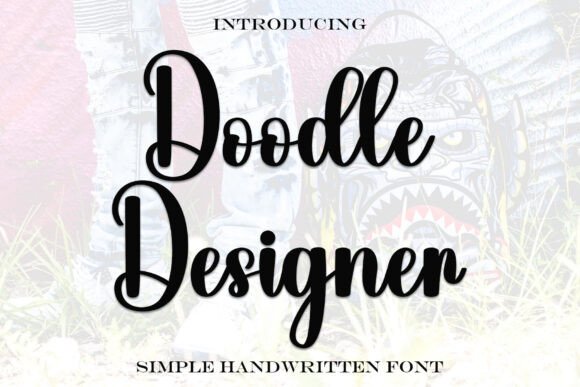
Doodle Designer is a script font with a gentle, flowing style that feels both personal and professional. Its soft curves and delicate strokes give it a romantic and joyful vibe, making it ideal for businesses that want to convey warmth and creativity. Whether you’re designing a logo, creating a menu, or crafting a thank-you card, this font brings a unique personality to your work.
It’s not just about looks—Doodle Designer is also designed with readability in mind. Even though it’s a script font, it maintains clarity at smaller sizes, which is essential for things like product labels, business cards, and mobile-friendly content. This makes it a versatile choice for a wide range of applications without sacrificing legibility.
Where to Use Doodle Designer in Your Business
One of the biggest advantages of Doodle Designer is its adaptability. It works well in various contexts, from print to digital, and can be used as a headline, logo, display text, or even an accent font. Here are some practical examples:
- Bakery Branding: Use Doodle Designer on your bakery’s logo and packaging to create a cozy, inviting feel.
- Handmade Candle Labels: A cursive font like Doodle Designer adds a personal touch to your product labels, making them stand out on shelves.
- Beauty Product Packaging: Pair Doodle Designer with a clean sans serif font to balance elegance with readability.
- Coaching Business: Incorporate Doodle Designer into your website headers or social media graphics to reflect your brand’s warm and approachable tone.
- Café Menus: Use Doodle Designer for your café’s menu headings to add a stylish, handcrafted look.
- Boutique Logo: A custom logo using Doodle Designer can help your boutique stand out in a competitive market.
- Online Shop Branding: Apply Doodle Designer to your store name, product titles, and promotional banners to maintain a cohesive brand identity.
By choosing Doodle Designer, you’re not just selecting a font—you’re building a visual language that communicates your brand’s personality and values.
How Doodle Designer Enhances Brand Consistency
Consistency is one of the most important aspects of branding. When your business materials all use the same font, it creates a sense of professionalism and reliability. Doodle Designer helps achieve this by offering a unified look across all your marketing assets.
For example, if you use Doodle Designer on your website, social media posts, and packaging, your customers will immediately recognize your brand. This familiarity builds trust and encourages repeat business. Plus, when your fonts are consistent, your brand appears more polished and intentional, which is especially important for small businesses looking to compete with larger brands.
When to Use Doodle Designer as a Headline or Logo
Doodle Designer is particularly effective as a headline or logo font. Its elegant, handwritten style is perfect for creating a memorable brand name or tagline. For instance, a boutique or café might use Doodle Designer in their logo to evoke a sense of artistry and craftsmanship.
However, it’s important to consider how the font will be used in different contexts. While Doodle Designer is great for large headlines, it may not be the best choice for body text due to its decorative nature. In such cases, pairing it with a clean sans serif font can help maintain readability while still keeping your design visually engaging.
Testing Before Committing
Before using Doodle Designer across all your branding materials, it’s a good idea to test it in different formats. Try using it on your website, social media posts, and printed materials to see how it looks in real-world settings. Pay attention to how it appears on mobile screens, in print, and in small spaces like product labels.
If you find that Doodle Designer works well in most scenarios but not in others, consider using it as an accent font rather than the primary typeface. This way, you can still benefit from its aesthetic appeal without compromising readability.
Pairing Doodle Designer with Other Fonts
While Doodle Designer is beautiful on its own, it can also be paired with other fonts to create a balanced and professional look. Here are a few simple pairing ideas:
- Pair with a Clean Sans Serif Font: Combine Doodle Designer with a modern sans serif font like Arial or Helvetica for a fresh, professional look.
- Pair with a Readable Serif Font: Use Doodle Designer for headlines and pair it with a classic serif font like Georgia or Times New Roman for body text.
- Use It as an Accent Font: Let Doodle Designer highlight key elements like product names or slogans while using a more neutral font for the rest of your design.
Experiment with different combinations to find what works best for your brand. The goal is to create a visual hierarchy that guides your audience’s eye and enhances your message.
Commercial Font Licensing Matters
Before using Doodle Designer on products, packaging, templates, or client work, make sure you understand the commercial font licensing terms. Some fonts are only available for personal use, while others require a purchase for commercial purposes. Always check the licensing agreement to ensure you’re using the font legally and responsibly.
Choosing the right font isn’t just about aesthetics—it’s about building a strong, trustworthy brand. With Doodle Designer, you have a powerful tool to enhance your brand’s visual identity and connect with your customers in a meaningful way.